| |
|
.NET TIPS
既定のテキスト・エディタの.EXEファイル・パスを取得するには?[C#、VB]
デジタルアドバンテージ 一色 政彦
2007/11/29 |
 |
|
「TIPS:既定のブラウザ/メーラの.EXEファイル・パスを取得するには?」では、既定のブラウザや既定のメーラの.EXEファイル(実行ファイル)パスを取得する方法を紹介した。本TIPSでは、「既定(デフォルト)のテキスト・エディタ」の.EXEファイル・パスを取得する方法を紹介する。
このような処理は、例えばプログラムから.htmlファイルを既定のテキスト・エディタで開きたいようなケースで役立つだろう。
既定のテキスト・エディタの.EXEファイル・パスを取得する方法
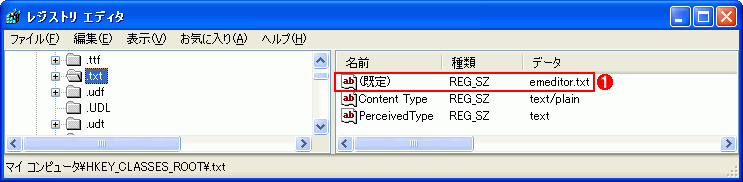
既定のテキスト・エディタの.EXEファイルのパスを調べるには、レジストリを参照するとよい。具体的には、まず次のキーの「(既定)」値を調べる。
- .txt拡張子へのマッピング:HKEY_CLASSES_ROOT\.txt
このレジストリ値(以降、<.txt値>)はテキスト・エディタの情報が格納された場所を示すための識別子であり、実際の場所を示すキーは次のようなものになる。
HKEY_CLASSES_ROOT\<.txt値>
このキーの配下から、本稿の目的である.EXEファイル・パスの情報も得られる。具体的には、次のキーの「(既定)」値から取得できる。
- .EXEファイルのパス:HKEY_CLASSES_ROOT\<.txt値>\shell\open\command
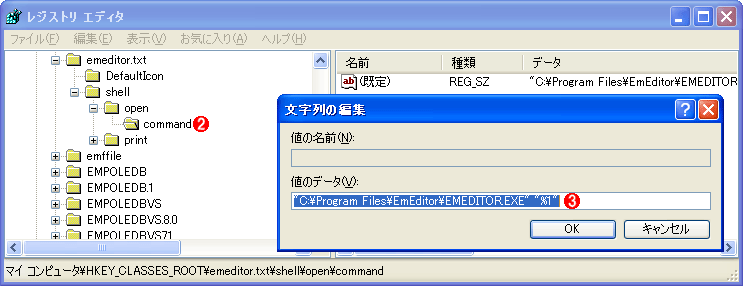
次の画面は、レジストリ・エディタを使って、実際に既定のテキスト・エディタのレジストリ値を調べているところである。
上の画面の例を見ると、レジストリ値では、既定のテキスト・エディタの.EXEファイルのフル・パスの後に「"%1"」というコマンドライン引数が続いている。コマンドライン引数(オプション)の方は、本稿の目的では不要なため、ここでは最初の.EXEファイル・パスのみを抽出すればOKである。
レジストリの値を取得する方法については、「TIPS:レジストリの値を取得するには?」を参考にしてほしい。なお、本稿のように「(既定)」の値を取得する場合には、RegistryKeyオブジェクト(Microsoft.Win32名前空間)のGetValueメソッドの第1パラメータに空文字(「""」もしくは「String.Empty」)を指定すればよい。
以上の処理を実装したコード例を次に示す。
using System;

using Microsoft.Win32;

using System.Diagnostics;


class Program

{

  static void Main(string[] args)

  {

    // 既定のテキスト・エディタのパスを取得する

    string textEditorPath = GetDefaultTextEditorExePath();


    // 既定のテキスト・エディタを立ち上げる

    Process.Start(textEditorPath);

  }


  private static string GetDefaultTextEditorExePath()

  {

    // 「HKEY_CLASSES_ROOT\.txt」の既定値(<.txt値>)を取得する

    string txtEditorName = "";


    // レジストリ・キーを開く

    string keyDotTxt = ".txt";

    RegistryKey rKeyDotTxt =

      Registry.ClassesRoot.OpenSubKey(keyDotTxt);

    if (rKeyDotTxt != null)

    {


      // レジストリの値を取得する

      string defaultValue =

        (string)rKeyDotTxt.GetValue(String.Empty);


      // レジストリ・キーを閉じる

      rKeyDotTxt.Close();


      txtEditorName = defaultValue;

    }

    if (txtEditorName == null || txtEditorName == "")

    {

      return "";

    }


    // 「HKEY_CLASSES_ROOT\<.txt値>\shell\open\command」

    // の既定値を取得する

    string path = "";


    // レジストリ・キーを開く

    string keyTxtEditor = txtEditorName + @"\shell\open\command";

    RegistryKey rKey =

      Registry.ClassesRoot.OpenSubKey(keyTxtEditor);

    if (rKey != null)

    {


      // レジストリの値を取得する

      string command = (string)rKey.GetValue(String.Empty);


      // レジストリ・キーを閉じる

      rKey.Close();


      if (command == null)

      {

        return path;

      }


      // 前後の余白を削る

      command = command.Trim();

      if (command.Length == 0)

      {

        return path;

      }


      // 「"」で始まるパス形式かどうかで処理を分ける

      if (command[0] == '"')

      {

        // 「"~"」間の文字列を抽出

        int endIndex = command.IndexOf('"', 1);

        if (endIndex != -1)

        {

          // 抽出開始を「1」ずらす分、長さも「1」引く

          path = command.Substring(1, endIndex - 1);

        }

      }

      else

      {

        // 「(先頭)~(スペース)」間の文字列を抽出

        int endIndex = command.IndexOf(' ');

        if (endIndex != -1)

        {

          path = command.Substring(0, endIndex);

        }

        else

        {

          path = command;

        }

      }

    }


    return path;

  }

} |
Imports Microsoft.Win32

Imports System.Diagnostics


Module Module1


  Sub Main()

    ' 既定のテキスト・エディタのパスを取得する

    Dim textEditorPath As String = GetDefaultTextEditorExePath()


    ' 既定のテキスト・エディタを立ち上げる

    Process.Start(textEditorPath)

  End Sub


  Private Function GetDefaultTextEditorExePath() As String

    ' 「HKEY_CLASSES_ROOT\.txt」の既定値(<.txt値>)を取得する

    Dim txtEditorName As String = ""


    ' レジストリ・キーを開く

    Dim keyDotTxt As String = ".txt"

    Dim rKeyDotTxt As RegistryKey = _

      Registry.ClassesRoot.OpenSubKey(keyDotTxt)


    If rKeyDotTxt IsNot Nothing Then


      ' レジストリの値を取得する

      Dim defaultValue As String = _

        CType(rKeyDotTxt.GetValue(String.Empty), String)


      ' レジストリ・キーを閉じる

      rKeyDotTxt.Close()


      txtEditorName = defaultValue

    End If

    If txtEditorName = Nothing Or txtEditorName = "" Then

      Return ""

    End If


    ' 「HKEY_CLASSES_ROOT\<.txt値>\shell\open\command」

    ' の既定値を取得する

    Dim path As String = ""


    ' レジストリ・キーを開く

    Dim keyTxtEditor As String = _

      txtEditorName + "\shell\open\command"

    Dim rKey As RegistryKey = _

      Registry.ClassesRoot.OpenSubKey(keyTxtEditor)

    If rKey IsNot Nothing Then


      ' レジストリの値を取得する

      Dim command As String = _

      CType(rKey.GetValue(String.Empty), String)


      ' レジストリ・キーを閉じる

      rKey.Close()


      If command Is Nothing Then

        Return path

      End If


      ' 前後の余白を削る

      command = command.Trim()

      If command.Length = 0 Then

        Return path

      End If


      ' 「"」で始まるパス形式かどうかで処理を分ける

      If command(0) = """"c Then

        ' 「"~"」間の文字列を抽出

        Dim endIndex As Integer = command.IndexOf(""""c, 1)

        If endIndex <> -1 Then

          ' 抽出開始を「1」ずらす分、長さも「1」引く

          path = command.Substring(1, endIndex - 1)

        End If

      Else

        ' 「(先頭)~(スペース)」間の文字列を抽出

        Dim endIndex As Integer = command.IndexOf(" "c)

        If endIndex <> -1 Then

          path = command.Substring(0, endIndex)

        Else

          path = command

        End If

      End If


    End If


    Return path


  End Function


End Module |
|
| 既定のテキスト・エディタの.EXEファイル・パスを取得するコンソール・アプリケーションのサンプル・プログラム(上:C#、下:VB) |
コードの意味、内容についてはコード中のコメントが参考になると思うので割愛する。
このサンプル・プログラムを実行すると、既定のテキスト・エディタが起動する。プログラムの起動方法については「TIPS:ほかのアプリケーションを実行するには?」を参考にされたい。
|
|
generated by
|
|
Insider.NET 記事ランキング
本日
月間