

|
|
|
 Insider's Eye
従来のCPU負荷に加え、ネットワーク・トラフィック表示も可能に
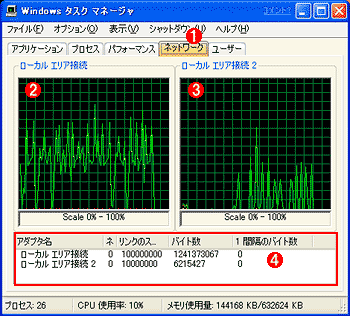
Windows XPでは、タスク・マネージャの機能が強化され、システムのCPU負荷だけではなく、ネットワーク・トラフィックも表示できるようになっている。従来は、パフォーマンスモニタやネットワークモニタを駆使しないと、ネットワークのトラフィック(負荷)を見ることができなかったので、管理者だけでなく、一般ユーザーにとってもこの機能は便利であろう。
 |
||||||||||||
| ネットワーク・トラフィック表示 | ||||||||||||
| タスクマネージャに、新しくネットワークのトラフィック(使用率)を表示する機能が追加された。 | ||||||||||||
|


容易になったSNTPサーバとの時刻同期
ファイルの更新時間などの整合性のために、ネットワーク上の各マシンの内部時計を同期させておくことは非常に重要である。特にネットワーク上のファイル・サーバへファイルを保存したり、他のマシンとファイルをやり取りする場合には、時間がずれていると、ファイルが新しいのか古いのかがまったく分からなくなるためだ。Windows 2000のActive Directoryネットワーク環境では、ドメインに参加しているWindows 2000クライアントは自動的に時刻を同期させるようにシステムが設定されていたが(正確な時刻はKerberos認証などでも必要なので、自動的に同期するようになっている)、そうでない場合は各クライアント側で時刻の同期を行うように設定しなければならなかった(net timeコマンドなどを使う。具体的な方法については「Windows TIPS:NTPでドメイン全体のマシンの時刻を合わせる」を参照)。Windows XPでは、「日付と時刻のプロパティ」にこの同期のための設定項目が用意されたので、簡単に設定できるようになった。ネットワークがインターネットに接続されていると、ここに指定されたサーバ(SNTPサーバ)に対して、定期的に時刻の同期操作を行うようになっている。
 |
||||||
| 時刻情報の同期設定 | ||||||
| タスクバーの右端に表示されている時計をダブルクリックすると、このプロパティが表示される。ここに新たに[インターネット時刻の設定]というタブが設けられ、簡単にSNTPサーバに同期させることができるようになった。 | ||||||
|
異なる複数のネットワークを1つのネットワークにまとめるブリッジ接続機能
ブリッジとは、ネットワークの参照モデルで言うと、データリンク層レベルでネットワーク・パケットを中継する機能であり、簡単にいうとイーサネット・ネットワークで使われるハブ(スイッチング・ハブ)に相当する。ルータ(ネットワーク層レベルでパケットを中継する機能)でネットワークを接続する場合、通常はそれぞれのネットワークに異なるネットワーク・アドレスを付与するが、ブリッジの場合は同一のネットワーク・アドレスを持つネットワークを1つにまとめることができる。イーサネット同士のネットワークではあまりその必要性はないが、IEEE 1394デバイスを使ったネットワーク(Windows XPで新たにサポートされた)や無線LAN、電話線を使ったネットワークなど、異なるメディアによるネットワーク間をブリッジで接続することにより、複雑なサブネットワーク構成をとらずに、シームレスにそれらを1つのネットワークにまとめ上げることができる。
 |
|||||||||
| ネットワークブリッジの設定 | |||||||||
| 2つ以上のネットワークアダプタを接続して、ブリッジ機能を実現することができる。ここでは例として2つのイーサネット・カードをブリッジ接続している。それぞれのネットワーク上にあるデバイスからの通信パケットは、このマシン上で(必要ならば)中継され、単一のネットワークであるかように振る舞う。スイッチング・ハブで中継しているのと同じ効果がある。なおこの場合、システムに付与されるIPアドレスはただ1つのみとなり、外部からは1台のマシンに見える。 | |||||||||
|
その他のネットワーク関連機能
最後に、上記以外のWindows XPのネットワーク関連の機能について言及しておこう。
■NetBEUI/DLCプロトコル・サポートの削除
NetBEUIプロトコルは、Windowsネットワークの最初期から使用されてきた由緒ある(?)プロトコルであったが、このWindows XPでは、とうとうその役目を終えたようである。デフォルトでもNetBEUIプロトコルは使用されていないし、プロトコルの一覧には表示されないので組み込むことはできない。最近ではTCP/IPがごく当たり前に使われているので、特に困ることはないだろう。同様に、DLC(Data Link Control)プロトコル(メインフレームや、プリンタとの通信プロトコルとしてよく使われていた)もなくなったようである。
■IPv6対応
IPv6は、現在のIPv4に次ぐ次世代のインターネット・プロトコルとして開発・普及が進められているが、Windows XPにはIPv6のプロトコル・スタックが用意されている。IPv6は、一般ユーザーにはまだほとんど縁がないが、インターネットのバックボーンなどでの採用は着々と進んでいるし、開発者ならばそろそろIPv6もターゲットに入れておかなければならない状況である。Windows XPにおけるIPv6サポートは、Windows(やマイクロソフト)におけるIPv6の実装を調べたり、それらとの相互運用性を検証するために用意されている。ただし(今回評価したベータ2バージョンでは)デフォルトでは組み込まれておらず、「ipv6 install」というコマンドを使って明示的にインストールする必要があった。
|
|
| IPv6コマンドの使用例 | |
| IPv6コマンドを使って、インターフェイス情報を表示し、ping6コマンドを実行したところ。IPv6では、「::192.168.0.1」というふうにして128bitのアドレスを表す(すべてみるに ここ をクリックしてください)。 |
■Home Editionにおけるドメイン参加への制限
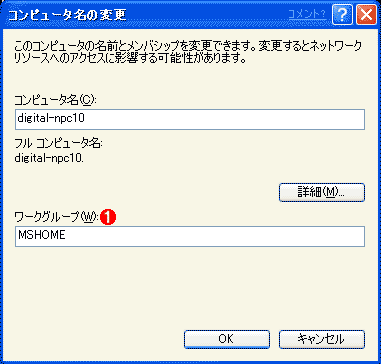
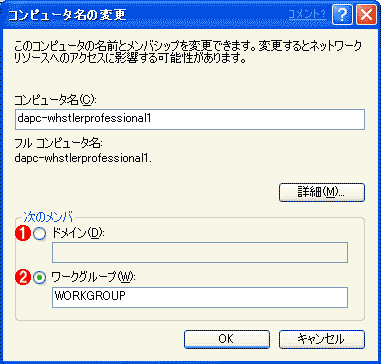
Windows XP Home Editionでは、Windows NTやActiveDirectoryのドメインへの参加機能が削除されており、常にワークグループ構成として稼動するようになっている(従来のWindows 9x/Meでは、ドメインに参加する機能が用意されていた)。これはWindows 9x/Me系ユーザーからの移行を考えて、面倒なネットワーク関係の設定をしなくてもすむようにしているためであろう。ドメインを使うような規模のネットワークでは、Professional版を使用することが推奨されている。
 |
|||
| Windows XP Home Editionのネットワーク設定画面 | |||
| ドメイン構成はなく、ワークグループでのみ運用ができる。 | |||
|
 |
||||||
| Windows XP Professionalのネットワーク設定画面 | ||||||
| ワークグループ構成とドメイン構成のどちらかを選択することができる。 | ||||||
|
| 関連記事 | ||
 |
Windows TIPS:NTPでドメイン全体のマシンの時刻を合わせる(Windows Server Insider) | |
 |
| INDEX | ||
| [Insider's Eye]Windows XP ベータ2日本語版クイックツアー | ||
| 1.ユーザーの簡易切り替え機能を使う | ||
| 2.ご安心あれ、クラシックスタイルUIも健在 | ||
| 3.統合表示が可能になったタスク・バー・ボタン | ||
| 4.初心者を意識したユーザー管理 | ||
| 5.強化されたネットワーク機能 (1) | ||
| 6.強化されたネットワーク機能 (2) | ||
 |
7.強化されたネットワーク機能 (3) | |
 |
||
 |
「Insider's Eye」 |
- Azure Web Appsの中を「コンソール」や「シェル」でのぞいてみる (2017/7/27)
AzureのWeb Appsはどのような仕組みで動いているのか、オンプレミスのWindows OSと何が違うのか、などをちょっと探訪してみよう - Azure Storage ExplorerでStorageを手軽に操作する (2017/7/24)
エクスプローラのような感覚でAzure Storageにアクセスできる無償ツール「Azure Storage Explorer」。いざというときに使えるよう、事前にセットアップしておこう - Win 10でキーボード配列が誤認識された場合の対処 (2017/7/21)
キーボード配列が異なる言語に誤認識された場合の対処方法を紹介。英語キーボードが日本語配列として認識された場合などは、正しいキー配列に設定し直そう - Azure Web AppsでWordPressをインストールしてみる (2017/7/20)
これまでのIaaSに続き、Azureの大きな特徴といえるPaaSサービス、Azure App Serviceを試してみた! まずはWordPressをインストールしてみる
 |
|
|
|
|

注目のテーマ




Windows Server Insider 記事ランキング
転職/派遣情報を探す


